Grove Base Cape for BeagleBone v2.0

Description

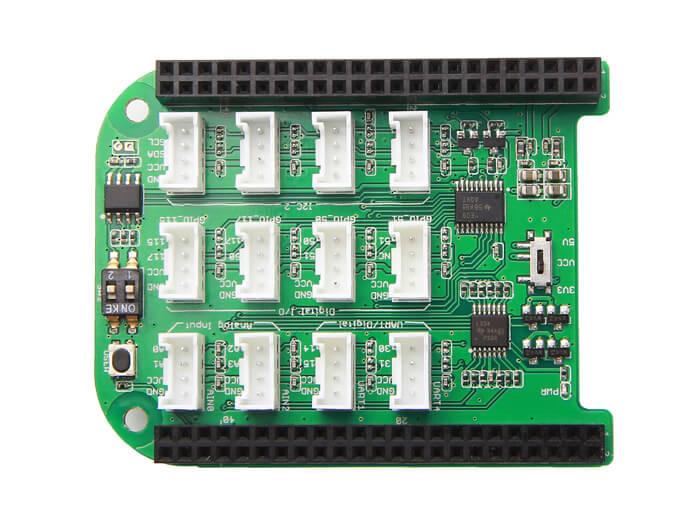
One of the best things about BeagleBone® Board is the massive accessible GPIOs coming out from its 2x 46 pin headers. However, as we know, all things has two sides – the good side and the bad side. 2×46 pins means 2×46 jumper wires, and 2×46 jumper wires putting on the board means – A REAL MESS. How can a rapid prototyping be called ‘rapid’ if you spend most of your time dealing with entangled wires? Now this Grove Base Cape for BeagleBone v2.0 is designed for real rapid prototyping with your BeagleBone® board.

The cape has brought the simplicity of Grove system to your BeagleBone® projects, just attach it directly onto your BeagleBone® v2.0, and then you can have 12 easy-to-use Grove connectors to do plug-and-play with the big family of Grove modules. The connectors include 2x UART, 2x ADC, 4x Digital I/O and 4x I2C that interface to the pins on your BeagleBone® board, offering almost everything you need. There are two switches used to reset the I2C address in case of address conflicts. The board also integrates a switch for voltage transition – from a normal 5V to 3.3V.

Features of Grove Base Cape for BeagleBone v2.0

  • 12 Grove Connectors includes
  • 2x UART
  • 2x Analog Input
  • 4x Digital I/O
  • 4x I2C Interface

Technical details

Dimensions 0mm x0mm x0mm
Weight G.W 49g
Battery Exclude

Part List

Grove Base Cape for BeagleBone® v2 1

ECCN/HTS

HSCODE 8473309000
USHSCODE 8471410150
UPC 841454117674
EUHSCODE 8471707000
COO CHINA

LEARN AND DOCUMENTS

Learn about Grove Base Cape for BeagleBone v2.0

It is so hot today! And I need to know that what is the temperature in my office now. What’s more, the sunshine seems too strong that I also want to get the light intensity. Now I decide to make a display of these two things with my BBGW and show it to my
This is my interactive emoji lamp, and the control of this is based on infrared detection. It means that you can put your hand on the left of the lamp to make it turn right and meanwhile an emoji symbol will display on the oled monitor. What is more, you
This tutorial is to introduce how the Grove – GPS can be used with your BeagleBone® Green Wireless(BBGW). And we will create an application that shows your position information on OLED, with a simple python script.
Today I make a little alarm clock for myself to remind me sign on. Actually I can use my phone to remind myself. But it doesn’t make me a “maker”. What I enjoy is the process. And I always believe that what I make will truly change my life! Happy hacking!
I always desired to control my device with my voice, so that I don’t need to remove my hands from my keyboard and mouse when I am playing a computer game! Though It may seem that I am very lazy, I did make it, using my BBGW.This tutorial is to introduce h
The summer is coming! I want to make an automatic fan on my table, so that i can enjoy the cool as soon as I come to my table.Of course the fan should be turned off automatically when I left. It seems it is easy to make it true with my BBGW and some grove
This series of tutorials aims at teaching the starters to use some Grove modules to realize their interesting ideas with BeagleBone® Green Wireless(BBGW). The tutorials are based on Python and mraa/upm library. We assume that you have already got started w
SeeedStudio BeagleBone® Green Wireless(SeeedStudio BBG Wireless) is a joint effort by BeagleBoard.org and Seeed Studio. The BBG Wireless has included two Grove connectors and support mraa library, making it easier to connect to the large family of Grove se
Wiki of Grove Base Cape for BeagleBone® v2.0
BeagleBone® Green Wireless (BBGW) through the Seeed Beta program. Working for resin.io and we support BBGW on the platform, so I’ve built a project combining the two technologies.The idea is to use an environmental sensor with BBGW, and deploy an applicati

Reviews

There are no reviews yet.

Be the first to review “Grove Base Cape for BeagleBone v2.0”